Software Guides · 7 min read
Best X-Ray Report Generators for Chiropractors
Last updated:
For a written chiropractic X-ray findings report alongside your current EHR, ChiroReports is our dedicated-report pick. For radiographic measurements and analysis documentation, PostureRay belongs in a different category. Make that distinction before comparing feature lists.
This guide includes software that produces report output for chiropractic radiographic workflows, not simply tools that display images. ChiroReports X-Ray Reports creates the written findings report. Analysis and mensuration tools work on the measurements and markings behind radiographic documentation. Some products connect those tasks, but “X-ray software” alone does not tell you which job a product does.
We publish this guide as ChiroReports. These are sourced workflow recommendations, not independent lab rankings, clinical efficacy claims or a head-to-head timing study.
How We Evaluate Chiropractic X-Ray Report Generators
- Report output: Is there a written findings document, an analysis report, a comparison report or just an image?
- Analysis features: Does the product measure or mark images, or organize findings the clinician has already determined?
- Time per report: Include source review, measurement where relevant, writing and final checking. Competitor speeds were not benchmarked.
- EHR requirement: Can you add it to your current workflow, or are you buying a broader clinical platform?
- Free option: Is a usable report included without a payment commitment?
The report is not the interpretation itself. You remain responsible for the findings you enter and how they relate to the clinical record. A polished document cannot make an unsupported observation more reliable.
Best For: Quick Picks
Written findings without an EHR switch: ChiroReports X-Ray Reports.
Radiographic mensuration and analysis documentation: PostureRay.
Posture assessment beside the imaging workflow: PostureScreen, an adjacent tool rather than a standalone X-ray report generator.
A wider software comparison: See our report-writing software guide.
This is deliberately a short core list. Generic charting and narrative software are discussed below, but are not promoted into verified X-ray generators without vendor evidence.
ChiroReports X-Ray Reports: The Written Findings Document
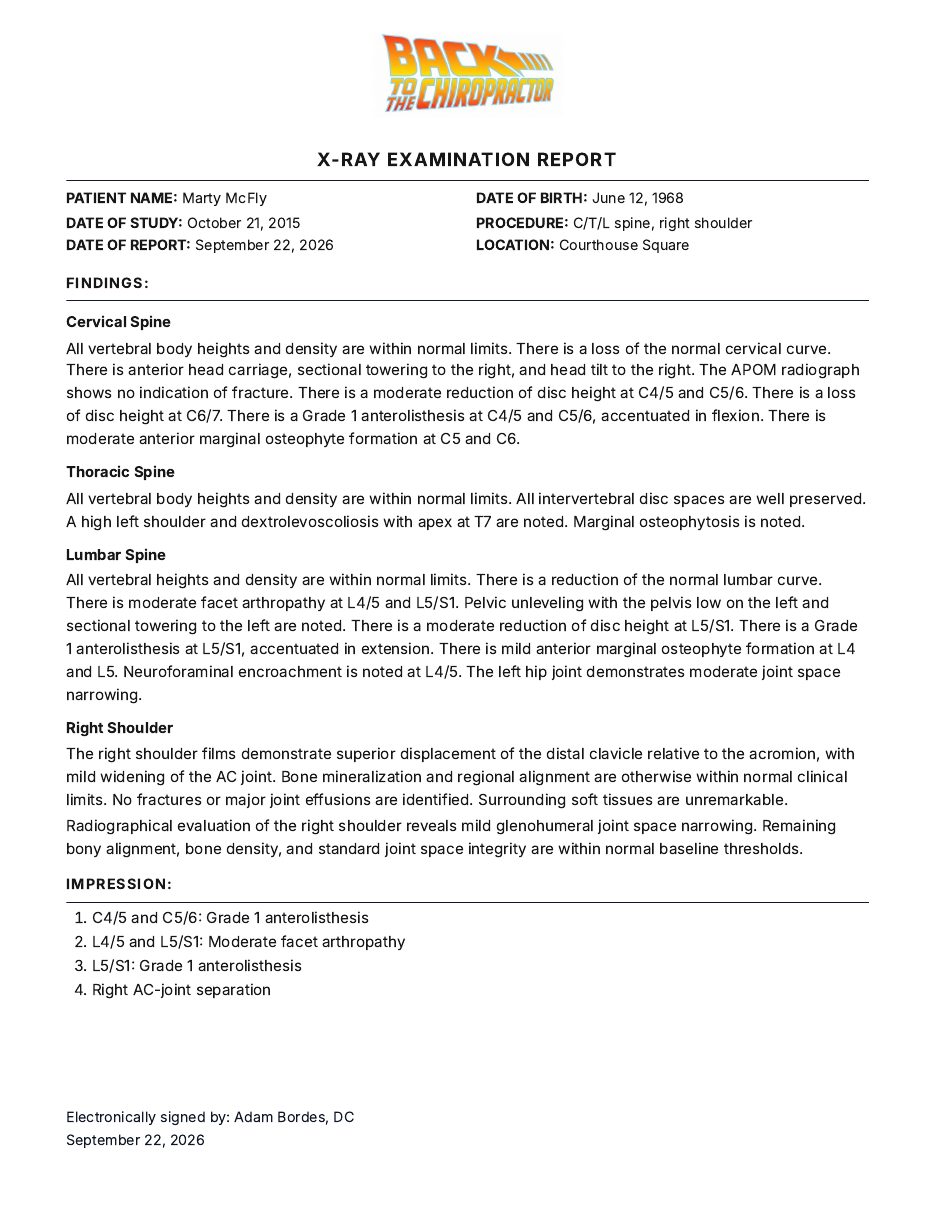
X-Ray Reports is one of the six ChiroReports tools. The finished report presents the complete written report on one screen with office branding. Reports take about 3 to 5 minutes.
It works alongside the EHR your practice already uses. No switch is required. Patient names and dates of birth never leave the browser, and the workflow is HIPAA-aligned.
What it produces: A written chiropractic X-ray report based on the clinician's findings. This is the reporting side of the workflow, not an automated image interpretation service.
Strengths:
- A dedicated written-report workflow rather than a full practice-management purchase.
- A finished report view with office branding.
- A free option for a practice that wants to assess the report-writing fit before paying.
Limitations: ChiroReports generates the report; it is not an X-ray image analysis or mensuration suite. Practices wanting automated line drawing and posture analysis should evaluate analysis tools and can still use ChiroReports for the written report.
Who it fits: A chiropractor who has already reviewed the images and needs to turn documented observations into a finished report without changing the office's EHR.
Pricing: Free Forever is $0 and includes one report per month, with no credit card. Pay Per Report is $19 per report. Scale is $149/month. Enterprise is $139 per provider/month at two providers, totaling $278/month. See current pricing.
PostureRay: Radiographic Analysis and Documentation
PostureCo describes PostureRay as a radiographic analysis and documentation system, including digital X-ray mensuration. That puts it on the analysis side of this comparison, rather than treating it as interchangeable with a written-report-only workflow.
What it produces: The vendor's public materials refer to reports, and its customer training includes Report & Comparison Report Generation. The training details are behind a customer sign-in. We therefore do not claim a specific narrative format, section set or export specification from that page.
Strengths: The verified distinction is radiographic measurements and documentation. If measurement work is your bottleneck, a report writer alone is not a substitute for this category.
Limitations: The vendor states that the doctor validates markings and is responsible for findings and clinical interpretation. Report availability does not mean the software replaces clinical judgment. Review a complete sample to see whether its output also meets your written-report needs.
Who it fits: A practice comparing radiographic analysis and mensuration workflows, including documentation of those measurements.
Purchasing model: The cited public product and training pages did not establish the current purchasing model. Obtain it directly from the vendor. No competitor amounts are reproduced in this guide.
Ask the vendor to show one routine study and one comparison study from start to finish. You want to understand where the measurements come from, what the clinician must validate and what the finished document actually says.
Adjacent Tools: Useful, but Different Jobs
PostureScreen: PostureCo presents it as a posture and movement assessment app. Its posture comparison and trend reports include PDF reports and annotated images. PostureRay documentation describes importing PostureScreen views. That supports an adjacent posture workflow, not calling PostureScreen a standalone X-ray findings generator.
ChiroTouch: Its official product page verifies EHR documentation, custom SOAP templates and practice-management functions. We did not verify a dedicated written X-ray report feature on that page. Evaluate it as an EHR option, and ask the vendor to demonstrate your specific radiographic documentation use case.
Report Master: Its official website describes initial, interim and final narratives, daily SOAP notes and personal injury or auto accident reports. Those are relevant to a broader reporting workflow, but do not establish dedicated X-ray report generation. It remains a dedicated-report option in the flagship software guide, not a verified core X-ray entry here.
For the broader EHR-versus-report-writer decision, visit our comparison hub. A shorter list is more useful than placing every documentation product under an X-ray heading.
What a Defensible X-Ray Report Includes
Think of defensibility as documentation quality, not a promised legal or insurance outcome. A useful report should let another reader follow what you observed and why it matters to your patient's care.
| Element | What to Document | What to Avoid |
|---|---|---|
| Study context | Study date, region and views or procedure, as applicable | A report with no clear link to the study |
| Findings | Specific observations and relevant location | Vague language that cannot be traced to the image review |
| Measurements | Values, units and method where clinically relevant | Adding measurements that were never performed |
| Clinical correlation | How the imaging observations relate to the documented clinical picture | Treating imaging alone as the entire explanation |
| Review | Check the findings and final wording before delivery | Assuming software output needs no clinician review |
Not every study needs every possible measurement. Include measurements when they are relevant and actually obtained. Do not add numbers simply because a template has a field for them.
Keep observations and clinical interpretation understandable. If a finding does not explain the complaint, the report should not imply that it does. If the source material is incomplete, resolve that gap rather than asking software to fill it with plausible language.
Choose the Tool for Your Actual Bottleneck
If your delay is image measurement, evaluate the analysis workflow. If your delay is organizing findings into readable prose, evaluate the report writer. If your delay is retrieving notes from disconnected office systems, that may be an EHR workflow problem.
Compare the whole process using a de-identified example. Check what information you must supply, what the finished output contains and how much review remains. Do not compare an analysis tool's marking time with a report writer's writing time as if they measured the same task.
The practical goal is a report you can review and stand behind clinically. The software should make the workflow easier without blurring who made the observations or what the source material supports.
Frequently Asked Questions
Is an X-ray viewer the same as a report generator?
No. Viewing an image, measuring it and producing a written findings report are different tasks. Verify the actual output before selecting software.
Does ChiroReports analyze X-ray images?
No. ChiroReports generates the written report from the clinician's findings. It is not an image analysis or mensuration suite.
Can I generate an X-ray report without changing EHRs?
Yes. ChiroReports X-Ray Reports works alongside the EHR your practice already uses, with no EHR switch required.
Is there a free X-ray report option?
ChiroReports Free Forever is $0 and includes one report per month of any supported type, with no credit card required.
Does posture analysis replace an X-ray findings report?
No. A posture assessment and a written radiographic findings report document different observations. PostureScreen belongs in the adjacent-tools category, not as a standalone X-ray report generator.