Software Guides · 8 min read
Best Chiropractic Report Writing Software
Last updated:
For a practice that wants a dedicated report writer without replacing its EHR, ChiroReports is our category pick. If you want charting, scheduling and billing in one system, start with the EHR category instead. Those are different purchases, and treating them as interchangeable makes the decision harder than it needs to be.
This guide is for chiropractors comparing tools for clinical reports and documentation. It is published by ChiroReports, not an independent testing lab. Picks reflect the workflow criteria below, not ratings, review counts or a head-to-head speed test. Competitor descriptions are drawn from their own public websites.
How We Compare Chiropractic Report Writing Software
Before choosing a product, compare these six things:
- Report types: Does it produce the document you actually need, or mainly encounter notes and business reports?
- Time per report: Include finding the records, entering information, reviewing the output and correcting it. We have not benchmarked competitor speeds.
- EHR requirement: Is this a report writer alongside your current system or a broader platform decision?
- Languages: Check which specific output is translated, not just whether a vendor mentions translation.
- Pricing model: Compare a per-report purchase, recurring access and a modular practice system without confusing their scope.
- Free option: Look for a usable free plan, not simply a demonstration.
Ask to see a finished clinical document. A product's “reporting” menu might mean revenue and appointment analytics rather than a narrative for an attorney. Neither is wrong. They solve different problems.
Best For: Quick Picks
Dedicated reports alongside your EHR: ChiroReports.
Dedicated narrative and SOAP workflow: Report Master.
All-in-one chiropractic practice management: Evaluate ChiroTouch, EZBIS, Genesis by ClinicMind and ChiroFusion.
Flexible charting-first clinic workflow: Jane App.
Imaging explanations in 14 languages: ChiroReports X-Ray & MRI Translator.
These are fit-based picks. The EHRs win the all-in-one practice-management category because their scope goes beyond report writing. No single EHR is declared the universal winner here.
Category 1: Dedicated Report Writers
ChiroReports: A Report Writer Without an EHR Switch
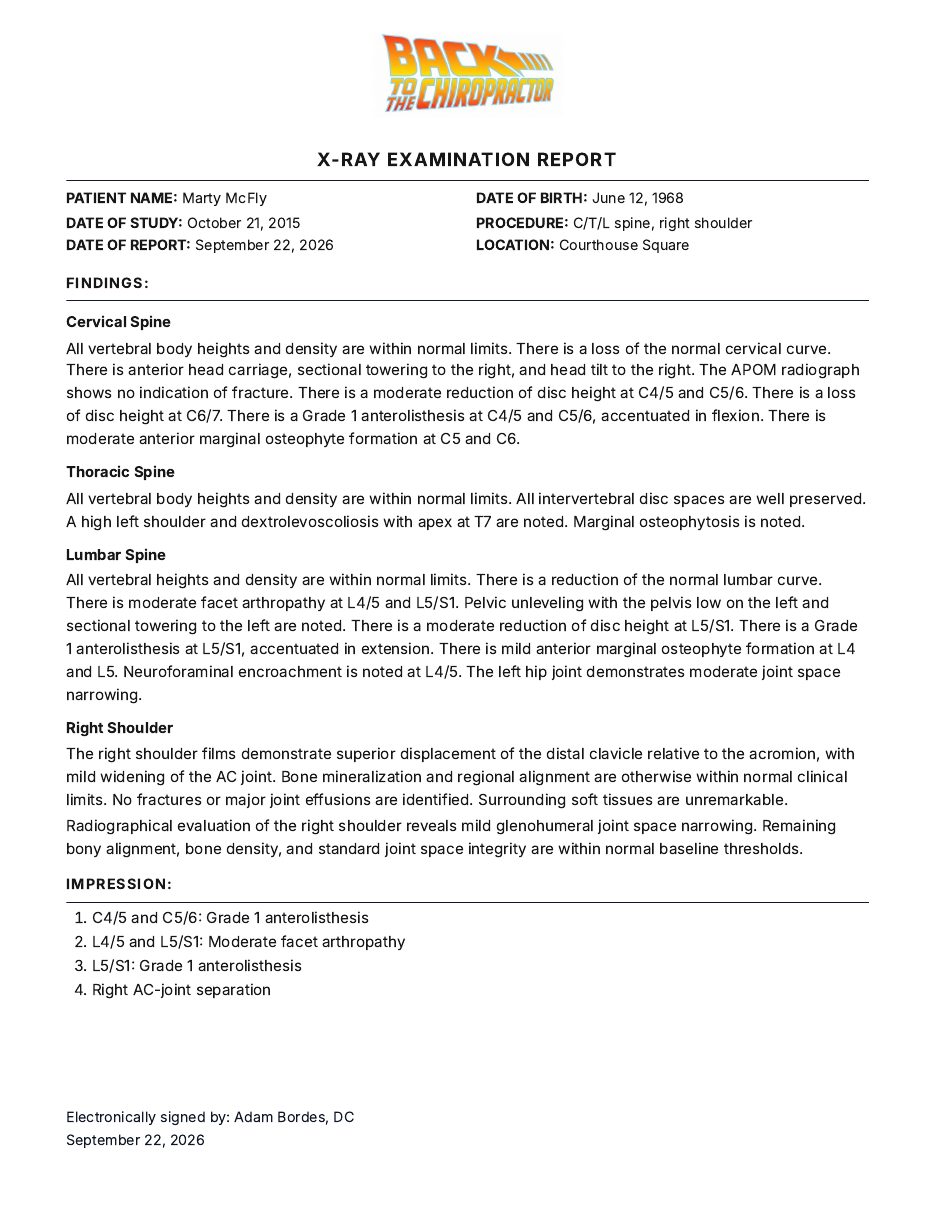
ChiroReports covers six tools: X-Ray Reports, Narrative Reports, X-Ray & MRI Translator, Supplement Plans, Exercise & Stretch Plans and Treatment Plans.
The positioning is straightforward: keep your EHR, add the report writer it never had.
- Strengths: Reports take about 3 to 5 minutes. It works alongside the practice's existing EHR, with no switch required. The X-Ray & MRI Translator supports 14 languages.
- Privacy: Patient names and dates of birth never leave the browser. The workflow is HIPAA-aligned.
- Limitations: ChiroReports does not do scheduling, billing or full practice management, and it is not an EHR. If you want one system for everything, an EHR on this list is the right call.
- Best fit: A practice that wants the finished report, not another practice-management migration.
- Pricing: Free Forever is $0 for one report per month, with no credit card. Pay Per Report is $19 per report. Scale is $149/month. Enterprise is $139 per provider/month at two providers, totaling $278/month. See current pricing.
Report Master: Dedicated Narrative and SOAP Documentation
Report Master's own website describes chiropractic report-writing software for initial, interim and final narrative reports, daily SOAP notes and personal injury or auto accident reports. Its current website presents the product and a pricing page; we do not infer a discontinued status or make claims about its current support arrangements.
- Strengths: A dedicated reporting and SOAP-note focus rather than the wider scheduling-and-billing scope of an EHR.
- Limitations: The cited public description does not establish parity with all six ChiroReports tools or its language coverage. Ask to see the precise report you need.
- Best fit: A chiropractor evaluating a dedicated narrative and encounter-documentation workflow.
- Pricing model: Its vendor pricing page describes a startup fee plus recurring membership. Verify the agreement with the vendor; competitor amounts are intentionally not reproduced here.
Category 2: EHRs With Documentation Built In
These systems deserve credit for all-in-one practice management. Their documentation sits inside a broader clinical and office workflow. That can be the right purchase when replacing or consolidating systems is part of your goal.
ChiroTouch: Connected Chiropractic Practice Management
ChiroTouch describes a connected system containing EHR, billing, scheduling, intake, payments and AI-powered documentation. Its documentation features include custom SOAP templates and AI-assisted SOAP notes.
- Strengths: Clinical documentation and office workflows within one platform.
- Limitations: SOAP features are not proof of a dedicated X-ray or complete PI narrative generator. Request a finished example for your intended use.
- Best fit: A practice shopping for both documentation and practice management.
- Pricing model: The official pricing page presents tiered plans and add-ons. Assess the complete configuration, not just the report-writing portion.
Jane App: Flexible, Charting-First Documentation
Jane's clinical documentation page describes customizable chart templates, SOAP notes, saved phrases and optional AI Scribe, with notes, forms and surveys organized in patient records.
- Strengths: Flexible documentation structure for a clinic that wants to chart in its own style.
- Limitations: General charting and clinic analytics should not be mistaken for a verified dedicated chiropractic narrative or X-ray generator.
- Best fit: A practice prioritizing adaptable encounter notes within its clinic platform.
- Pricing model: Jane's pricing page describes tiered plans with optional add-ons.
EZBIS: Narratives Within an EHR
EZBIS explicitly describes generating professional narratives, SOAP notes and other health documentation. Its EHR can be a standalone system or a module combined with billing and appointment scheduling.
- Strengths: An explicit narrative capability, with documentation available in a broader modular practice system.
- Limitations: Confirm which configuration and narrative output you need. Body-chart illustrations are not evidence of radiographic image analysis.
- Best fit: A practice wanting narrative documentation in an EHR or a combined EZBIS office workflow.
- Pricing model: The vendor describes a modular product structure. Obtain terms for your selected configuration directly.
Genesis Chiropractic Software: Now ClinicMind
The official Genesis site identifies the product as formerly Genesis, now ClinicMind EHR. It describes SOAP notes, care plans, scheduling, integrated billing and documentation.
- Strengths: A broader practice platform connecting clinical and administrative work.
- Limitations: Those public descriptions do not establish a dedicated narrative or X-ray report generator. Ask for the actual clinical document, not just an analytics screen.
- Best fit: A practice evaluating an integrated chiropractic EHR and office workflow.
- Pricing model: The page describes a monthly subscription shared across its modules. Confirm configuration and terms with ClinicMind.
ChiroFusion: Cloud EHR Documentation and Office Workflows
ChiroFusion's official feature page describes a cloud EHR, scheduling, billing, SOAP documentation, templates and macros, and custom care plans.
- Strengths: Documentation and practice management in the same system.
- Limitations: The cited page supports SOAP and care-plan claims, not a verified dedicated narrative or radiographic reporting feature.
- Best fit: A chiropractic practice comparing cloud practice-management systems rather than only standalone report writers.
- Pricing model: This guide does not characterize terms that were not verified on the cited feature page. Request the current purchasing model from the vendor.
Methods That Are Not Software Products
Word templates: A familiar template can work well when someone owns the structure and reviews every section. The tradeoff is manual assembly, version control and the risk of carrying a previous patient's detail into the next report. That is a workflow issue, not a reason to dismiss templates.
Dictation: Speaking a narrative can preserve your clinical voice. It still needs organization, transcription review and checks against the record. Count that editing time when comparing it with a guided writer, rather than timing only the spoken draft.
How to Choose: Three Questions
- Do you need a full EHR or just reports? Keep a working EHR decision separate from a report-writing problem. Our comparison hub explores that distinction.
- How many reports do you write a week? Use your actual volume to compare free, per-report and recurring options. Include clinician review time in the calculation.
- Do you treat PI patients? Look for a clear history, examination, diagnoses and treatment rationale. Read our defensible SOAP documentation lesson and use the ICD-10 Code Lookup to check diagnosis specificity, not to replace clinical reasoning.
The right choice produces the document you need without forcing you to buy a different workflow. Start with that requirement, then evaluate the larger system around it.
Frequently Asked Questions
Do I need a new EHR to write chiropractic reports?
No. A dedicated report writer such as ChiroReports works alongside your existing EHR. An EHR change is a separate practice-management decision.
Is there a free chiropractic report-writing option?
ChiroReports Free Forever is $0 and includes one report per month, with no credit card required.
How long does a ChiroReports report take?
ChiroReports reports take about 3 to 5 minutes. This is not a comparative speed benchmark against other vendors.
Which option fits an all-in-one practice workflow?
Evaluate the EHR entries for integrated charting and practice management. ChiroReports is a report writer, not an EHR, and does not provide scheduling or billing.
Can imaging findings be explained in other languages?
The ChiroReports X-Ray & MRI Translator renders imaging findings in plain language in 14 languages. This does not mean every report type supports 14 languages.