Software Guides · 8 min read
Best Narrative Report Software for Chiropractors
Last updated:
For a dedicated chiropractic narrative without changing your EHR, ChiroReports is our report-writing pick. If you also need daily charting, scheduling and billing in the same system, compare the EHR entries. Word templates and dictation remain a legitimate baseline, especially when your process is already consistent.
A narrative report should tell your patient's story, document the findings and explain the treatment plan in an organized account. Attorneys, insurers and other clinicians may read it. They need enough context to follow your reasoning, not just a stack of encounter notes.
This guide is published by ChiroReports. Recommendations reflect the criteria below and vendor-owned public descriptions, not independent product testing. No software can guarantee how an attorney, insurer or other reviewer will respond to a report.
How We Compare Chiropractic Narrative Report Software
- Completeness of sections: Can the output organize history, examination, diagnoses, treatment and prognosis?
- Time per report: Include collecting the records, drafting, checking and correcting. Competitor speeds were not benchmarked.
- PI suitability: Does the document make the clinical course understandable without inventing causation or promising an outcome?
- EHR requirement: Are you adding a report writer or choosing a broader office platform?
- Free option: Can you produce a usable report before committing to paid access?
A SOAP-note feature is valuable, but it does not automatically establish a dedicated narrative generator. In this guide, those tools are described as charting-first unless the vendor explicitly says it generates narratives.
Best For: Quick Picks
Dedicated narratives alongside your EHR: ChiroReports Narrative Reports.
Dedicated narrative and SOAP documentation: Report Master.
Narratives within an EHR: EZBIS, whose vendor explicitly describes narrative generation.
Integrated practice-management evaluation: ChiroTouch and ChiroFusion.
Flexible charting-first workflow: Jane App.
Maximum manual control: A maintained Word template plus careful dictation and editing.
These picks are about fit, not a claim that any product is fastest, highest rated or suitable for every PI case.
ChiroReports Narrative Reports: Dedicated Report Writing
Narrative Reports is one of six ChiroReports tools. Narrative and initial reports draw on the same clinical content a chiropractor already collects, and reports take about 3 to 5 minutes.
MRI findings can be incorporated. The separate X-Ray & MRI Translator renders imaging findings in plain language in 14 languages. That translation capability should not be confused with saying every narrative is available in 14 languages.
Where applicable, impairment is a section inside the narrative report. It is never a standalone report.
The positioning is simple: keep your EHR, add the report writer it never had.
- Strengths: A dedicated narrative workflow that works alongside the existing EHR, with no switch required.
- Privacy: Patient names and dates of birth never leave the browser. The workflow is HIPAA-aligned.
- Limitations: ChiroReports writes the report, not the daily SOAP notes, scheduling or billing. A practice wanting its EHR to do everything in one login should weigh the EHR entries on this list.
- Who it fits: A chiropractor who needs a finished narrative from clinical information already collected, rather than a replacement office platform.
- Pricing: Free Forever is $0 with one report per month and no credit card. Pay Per Report is $19 per report. Scale is $149/month. Enterprise is $139 per provider/month at two providers, totaling $278/month. Current pricing explains the plans.
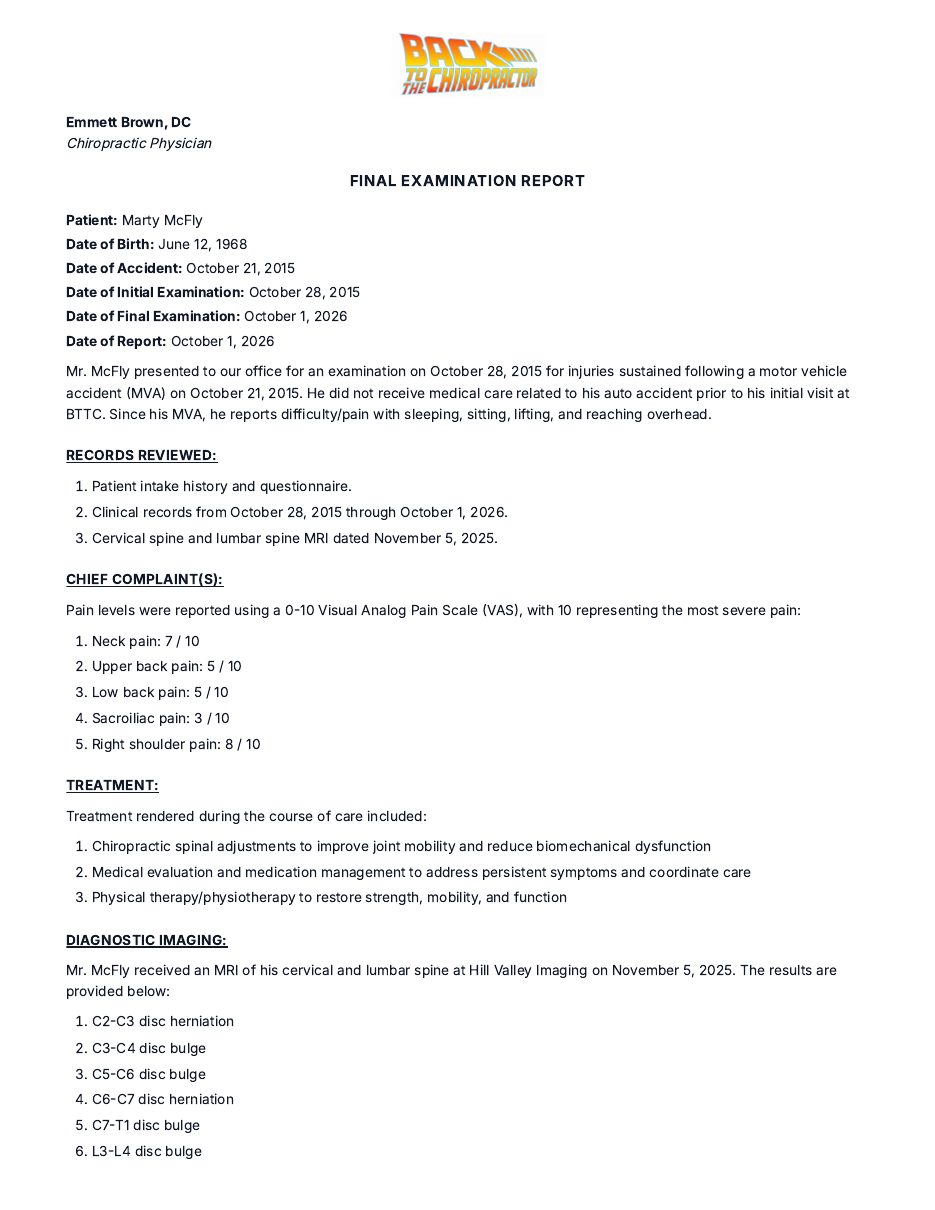
Report Master: Dedicated Narratives and SOAP Notes
Report Master's official site describes initial, interim and final narrative reports, daily SOAP notes and personal injury or auto accident reports. The current vendor site presents the product and purchasing information. We do not characterize its support status beyond those public statements.
- Strengths: Explicit narrative-report types in a dedicated documentation product.
- Limitations: Confirm the current workflow and final output with the vendor. The cited page does not establish the same six-tool scope or translation capability as ChiroReports.
- Who it fits: A chiropractor comparing dedicated narrative and daily SOAP documentation software.
- Pricing model: Its pricing page describes a startup fee plus recurring membership, without competitor amounts reproduced here.
EZBIS: Explicit Narrative Generation Inside an EHR
EZBIS describes generating professional narratives, SOAP notes and other health documentation. Its EHR is available as a standalone system or a module combined with billing and scheduling.
- Strengths: Verified narrative generation within an EHR, with the option of a broader integrated office workflow.
- Limitations: Review a complete narrative for your intended purpose and confirm the selected configuration. The word “narrative” alone does not establish every section you need.
- Who it fits: A practice that wants narrative documentation as part of its EHR decision.
- Pricing model: The vendor describes a modular structure. Obtain current configuration terms directly.
ChiroTouch: Documentation Within Practice Management
ChiroTouch's public product page describes custom SOAP templates, AI-assisted SOAP notes and connected EHR, billing, scheduling and intake functions.
- Strengths: Charting and office workflows together rather than a separate report-only purchase.
- Limitations: The cited features establish SOAP documentation, not a verified complete PI narrative generator. Ask to see how a multi-visit clinical story becomes the document you intend to send.
- Who it fits: A practice looking at documentation and practice management together.
- Pricing model: The vendor pricing page presents tiered plans with add-ons.
Jane App: Charting First, With Flexible Templates
Jane describes customizable templates, SOAP notes, saved phrases and optional AI Scribe. It organizes notes, forms and surveys within patient records.
- Strengths: A flexible way to structure encounter documentation in the clinic's own style.
- Limitations: These are charting capabilities, not verified dedicated chiropractic narrative generation. A narrative assembled from notes still needs context, organization and review.
- Who it fits: A practice prioritizing adaptable charting and willing to assess its narrative workflow separately.
- Pricing model: Jane's official pricing page describes tiered plans and optional add-ons.
ChiroFusion: EHR Documentation and Care Plans
ChiroFusion's official feature page describes a cloud EHR with SOAP notes, templates and macros, custom care plans, scheduling and billing.
- Strengths: Encounter documentation and administrative work in one practice system.
- Limitations: The reviewed feature page does not establish a dedicated complete narrative generator. Do not equate a care plan or daily note with a final narrative without seeing the output.
- Who it fits: A practice comparing integrated EHR workflows, including how its existing chart content supports report preparation.
- Pricing model: Current purchasing terms were not established by the cited feature page. Ask the vendor directly rather than rely on an unverified description.
The Baseline: Word Templates and Dictation
Many practices prepare narratives this way. A Word template gives you direct control over the structure, and dictation can preserve the way you explain clinical reasoning. Neither method deserves to be mocked because it is familiar.
The real costs are the evenings spent assembling records, editing transcription and checking for inconsistencies. Those costs depend on the practice. We are not assigning a made-up time or dollar figure to them.
Keep a clean master template, remove stale patient-specific details and review the finished document against the record. Dictation is a draft, not a substitute for checking dates, findings and the logic connecting them. If this workflow already produces consistent narratives efficiently, switching software is not automatically necessary.
What a Complete Narrative Includes
| Section | The Reader's Question |
|---|---|
| History | What happened, what changed and what relevant background matters? |
| Examination findings | What did you observe and measure? |
| Diagnosis | How do the documented findings support the diagnosis? |
| Treatment plan | What care is planned, and why? |
| Prognosis | What is the documented clinical expectation, including uncertainty? |
| Impairment section, where applicable | What belongs in this section inside the narrative, supported by the relevant clinical record? |
Do not force every available field into every case. Completeness means the relevant clinical story is present, not that the report is as long as possible. Separate reported symptoms, observed findings and clinical interpretation so another reader can follow the reasoning.
For the underlying encounter record, see what makes a SOAP note defensible. Good source documentation makes narrative preparation easier, but “defensible” describes documentation quality, not a promised legal result.
Choose a Narrative Workflow, Not Just a Feature Label
Use a de-identified case to compare the finished documents. Look for a coherent story, accurate dates, supported findings and a treatment rationale that matches the record. Check what work remains after the first draft.
For the broader market, read Best Chiropractic Report Writing Software. For radiographic documentation, see Best X-Ray Report Generators for Chiropractors. Our comparison hub separates report-writer decisions from EHR decisions.
Choose the product or method that removes your actual bottleneck while keeping clinician review in place. The goal is a clear, patient-specific account of care, not a longer report or a promise about what happens after it is sent.
Frequently Asked Questions
What belongs in a chiropractic narrative report?
A complete narrative includes history, examination findings, diagnosis, treatment plan and prognosis. Where applicable, impairment is a section inside the narrative report, not a separate report.
Are SOAP notes the same as a narrative report?
No. SOAP notes record encounters. A narrative organizes the relevant history, findings and clinical reasoning into a broader account of care.
Can a narrative report include MRI findings?
Yes. MRI findings can be incorporated into ChiroReports Narrative Reports. The separate X-Ray & MRI Translator explains imaging findings in plain language in 14 languages.
Does report software guarantee acceptance by an insurer or attorney?
No. Software helps organize documentation. Accuracy, clinical judgment, review requirements and the facts of the case still matter; no legal or insurance outcome is promised.
Can I try a narrative writer without a monthly commitment?
ChiroReports Free Forever is $0 with one report per month and no credit card required. Pay Per Report is $19 per report.